Creating a Professional Office Scene Animation with AniFuzion
08 Jan
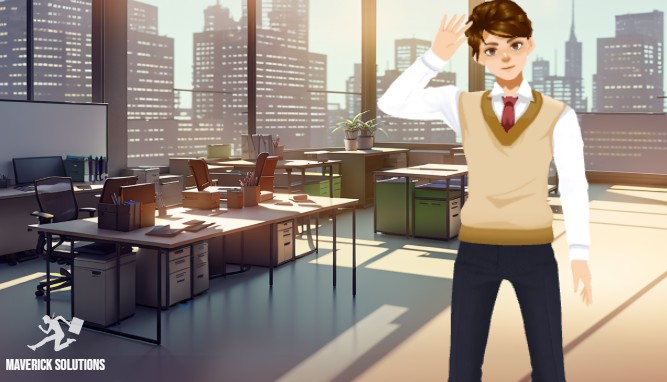
Visual Paradigm’s Animation Maker, also known as AniFuzion, enables users to create professional-grade 2D and 3D animations without requiring advanced design skills. The provided image showcases a realistic office environment, complete with a character in business attire standing in a modern workspace. This scene demonstrates the tool’s capability to produce engaging, narrative-driven content that can be used for corporate presentations, training modules, or marketing materials. AniFuzion’s intuitive interface allows users to construct detailed scenes quickly, making it a powerful solution for professionals who need to communicate complex ideas through dynamic visuals. The integration of AI features like text-to-speech and automatic lipsync further enhances the realism and impact of the animation.
Key Takeaways
-
Visual Paradigm’s Animation Maker (AniFuzion) allows users to create professional 2D and 3D animations without design expertise.
-
The tool features a drag-and-drop interface, extensive 3D character library, and pre-built actions for rapid animation creation.
-
AI-powered features like text-to-speech and automatic lipsync enhance realism and engagement.
-
Users can export animations as MP4 videos or interactive flipbooks for easy sharing.
-
Creating professional office scenes, like the one shown, is straightforward with AniFuzion’s scene templates and props.
How AniFuzion Enables Professional Animation Creation
AniFuzion simplifies the animation process by providing a user-friendly, browser-based platform. Users can start a new project and immediately access a wide range of tools to build their scenes. The drag-and-drop interface allows for quick placement of elements like characters, props, and backgrounds, making the workflow intuitive and efficient. For the office scene depicted in the image, users can select a 3D character from the library, customize their appearance, and position them within a pre-built office environment. This approach saves time and effort compared to creating scenes from scratch.
The tool’s extensive 3D character library includes thousands of customizable options, enabling users to create diverse and realistic characters. In the provided image, the character is dressed in business attire, which can be achieved by selecting a base character and adjusting their clothing and accessories. The character’s pose and movement can be enhanced using pre-built actions, such as walking or gesturing, which are easily applied from the motion library. This feature ensures that the character’s actions appear natural and fluid, contributing to the overall professionalism of the animation.
Enhancing Animations with AI Features
AniFuzion incorporates advanced AI capabilities to improve the quality and realism of animations. The AI text-to-speech (TTS) feature allows users to generate voiceovers directly within the tool. By inputting a script, users can choose from various voice accents and emotional tones, creating a personalized narration for their animation. This feature is particularly useful for creating educational content or presentations, where clear and engaging audio is essential.
Automatic lipsync ensures that the character’s mouth movements are perfectly synchronized with the audio, adding a layer of realism that would be difficult to achieve manually. This feature is critical for dialogues and voiceovers, as it makes the characters appear more lifelike and engaging. The combination of AI-powered voiceovers and automatic lipsync significantly enhances the overall quality of the animation, making it more effective for communication and storytelling.
Building Detailed Scenes with Templates and Props
AniFuzion provides users with a variety of tools to create detailed and immersive scenes. The platform includes ready-to-use scenes, props, and templates that can be quickly integrated into a project. For the office scene shown in the image, users can select a pre-built office environment and customize it with various props, such as desks, chairs, and office supplies. This approach allows for rapid scene construction, enabling users to focus on the content and message of their animation.
The tool’s ability to mix 2D and 3D elements adds versatility to the animation process. Users can incorporate 2D text and shapes with 3D characters and environments, creating a dynamic and visually engaging experience. For example, text animations can be used to highlight key points or provide additional information, while 3D characters can bring the narrative to life. This combination of elements allows for greater creativity and flexibility in content creation.
Exporting and Sharing Animations
Once the animation is complete, users can export it in various formats to suit their needs. AniFuzion allows users to export animations as MP4 videos, which can be easily shared on social media, embedded in websites, or used in presentations. The tool also supports the creation of interactive flipbooks, which can be shared via hyperlinks or embed codes. This feature is particularly useful for creating interactive content that users can explore at their own pace.
The ability to export animations in multiple formats ensures that users can reach their target audience effectively. Whether the goal is to create a promotional video, an educational resource, or an internal communication tool, AniFuzion provides the necessary tools to produce high-quality content. The intuitive interface and comprehensive feature set make it accessible to users of all skill levels, from beginners to experienced animators.
Conclusion
Visual Paradigm’s Animation Maker (AniFuzion) offers a powerful and accessible solution for creating professional-grade animations. The tool’s intuitive interface, extensive library of 3D characters and props, and advanced AI features make it ideal for a wide range of applications, from corporate presentations to educational content. The ability to create detailed scenes, such as the office environment shown in the image, is made easy with AniFuzion’s pre-built templates and customization options. By leveraging the tool’s capabilities, users can produce engaging and impactful animations that effectively communicate their message.
To experience the power of AniFuzion firsthand, visit the official website and start creating your own animations today. Try AniFuzion now.
Related Links
-
Visual Paradigm Online Animation Maker (AniFuzion): Create professional-quality animated videos and motion graphics easily with Visual Paradigm’s versatile online animation tool.
-
Comprehensive Guide to Using Visual Paradigm Online’s Anifuzion: Explore this comprehensive resource to learn how to navigate AniFuzion’s interface and leverage its powerful animation tools for professional storytelling.
-
Introducing Visual Paradigm’s Anifuzion: The Ultimate Animated Video Maker: Learn how Anifuzion streamlines the creation of dynamic animations with features like AI-powered text-to-speech and a diverse library of 3D characters.
-
Creative Motion Graphics with Anifuzion (Pinterest Inspiration): Explore visual inspiration and creative examples of professional motion graphics and video projects developed using the Anifuzion animation engine.
-
Comprehensive Guide to Swapping Characters in AniFuzion: Master the character swap functionality within Visual Paradigm Online to maintain creative flow and save time by reusing animations across different character models.