Revolutionizing Use Case Documentation: How AI-Powered PlantUML Report Generation Saves Hours of Manual Work
09 Dec
In the world of software requirements and systems analysis, use case diagrams remain one of the most effective ways to communicate “who does what” in a system. For years, teams have relied on tools like PlantUML to create clean, text-based UML diagrams that can be version-controlled alongside code. Yet, despite the elegance of a well-written PlantUML script, one persistent pain point has remained unchanged:
Turning a visual (or text-based) use case diagram into professional, stakeholder-ready documentation is still a tedious, manual task.
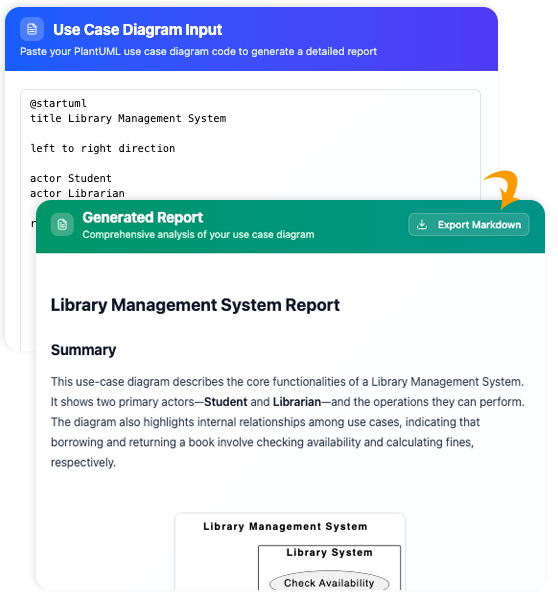
Enter the AI Use Case Diagram Report Generator — a breakthrough tool that instantly transforms raw PlantUML use case code into a complete, beautifully structured textual report, complete with summaries, actor descriptions, use case details, and relationship analysis.
From Diagram to Documentation in Seconds
Imagine this common scenario:
You’ve just finished refining a use case diagram in PlantUML for an online banking system. Your .puml file is clean, versioned in Git, and renders perfectly. Now your project manager asks for the “official use case documentation” for the upcoming review meeting with business stakeholders.
Traditionally, you would:
- Open a Word document or Confluence page
- Manually list every actor
- Copy-paste and rephrase each use case
- Draw or describe include/extend relationships
- Write a high-level summary
- Format everything consistently
This process easily takes 2–6 hours per diagram.
With the AI Use Case Diagram Report Generator, the same result is achieved in under 30 seconds.
How It Works: A Seamless Two-Step Process
- Paste Your PlantUML Code Simply copy your existing @startuml … @enduml use case code into the left panel. The tool instantly renders a live preview on the right — exactly like any PlantUML editor you already use.
- Click “Generate with AI” The built-in AI engine parses the entire diagram (actors, use cases, associations, <<include>>, <<extend>>, generalizations, notes, etc.) and produces a full-fledged report automatically.
That’s it. No prompts to write. No templates to fill. No risk of human oversight.
What the Generated Report Contains
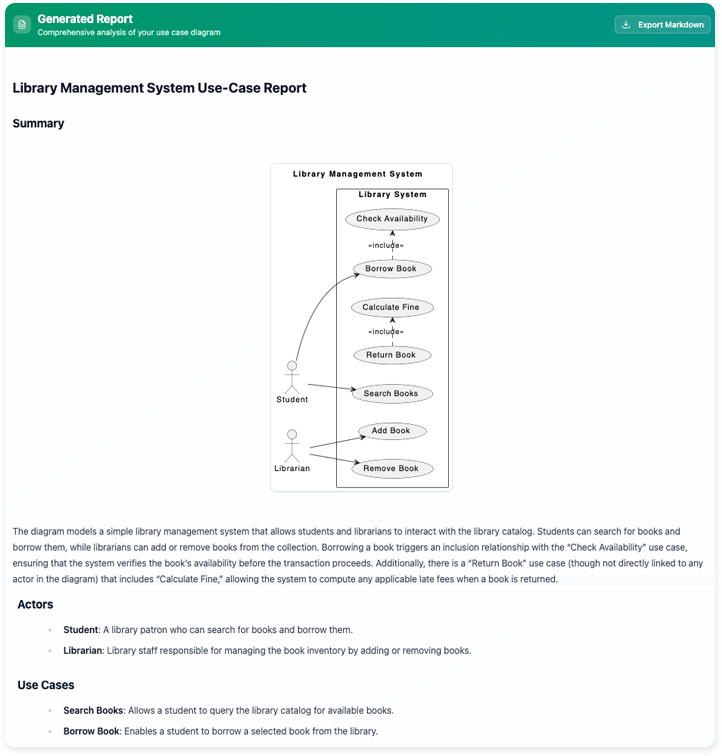
The output is far more than a simple list. It is a complete, ready-to-share requirements document structured as follows:
1. Problem Domain Title
An intelligently inferred title that reflects the system’s context. Example: “Online Banking System – Customer and Administrative Functions”
2. High-Level Summary
A concise yet comprehensive paragraph explaining the purpose and scope of the system as depicted in the diagram.
3. Actors and Their Roles
Every actor is listed with a clear, natural-language description of who they are and their role in the system. Example:
- Customer: An individual who has registered for online banking services and performs day-to-day transactions.
- Bank Teller: Internal staff member who assists customers and handles exceptional cases.
4. Use Cases with Descriptions
Each use case receives a brief, precise functional description derived from its name, notes, and relationships. Example:
- Transfer Funds – Allows a customer to move money between their own accounts or to external beneficiaries.
- View Transaction History – Displays past transactions with filtering and export capabilities.
5. Actor–Use Case Interaction Matrix
A clear mapping showing exactly which actors participate in which use cases (primary vs. secondary).
6. Use Case Relationships Analysis
The most powerful section: the AI automatically detects and explains:
- <<include>> relationships (mandatory sub-functions)
- <<extend>> relationships (optional or conditional variations)
- Generalization between actors or use cases
- Any attached notes or comments
Example output snippet:
“The use case ‘Withdraw Cash’ extends ‘Perform Transaction’ under the condition that the transaction type is a cash withdrawal at an ATM. In contrast, ‘Transfer Funds’ includes ‘Validate Sufficient Balance’ and ‘Authenticate User’ as mandatory steps.”
Why Teams Are Adopting This Tool Rapidly
| Benefit | Traditional Way | With AI Report Generator |
|---|---|---|
| Time to produce documentation | 2–8 hours per diagram | < 1 minute |
| Consistency | Varies by author | Always uniform style and depth |
| Error rate | High (missed use cases, typos) | Near-zero (machine parsed) |
| Version alignment | Documentation drifts from diagram | Always 1:1 with current PlantUML |
| Stakeholder readiness | Requires heavy editing | Ready to send immediately |
Real-World Use Cases
- Agile Teams: Keep living documentation perfectly in sync with evolving PlantUML diagrams in your repo.
- Regulated Industries (finance, healthcare, aviation): Produce traceable, audit-ready requirements documents instantly.
- Consultancies & System Integrators: Deliver professional documentation packages to clients without extra billing hours.
- Educational Settings: Teach students not just how to draw diagrams, but how to communicate them effectively.
Integration into Existing Workflows
Because the tool accepts raw PlantUML, it fits seamlessly into any stack:
- Copy from VS Code, IntelliJ, or your Git repository
- Use in CI/CD: generate and publish the report automatically on each merge
- Export as Markdown, HTML, or PDF for Confluence, Jira, or enterprise wiki
Try It Today
The AI Use Case Diagram Report Generator is available now as part of Visual Paradigm’s online platform:
🔗 https://www.visual-paradigm.com/features/ai-use-case-diagram-report-generator/
Whether you are a solo business analyst maintaining dozens of diagrams, or part of a large enterprise architecture team, this tool eliminates one of the last remaining manual bottlenecks in modern requirements engineering.
Stop rewriting what your diagram already says perfectly. Let AI translate your PlantUML into eloquent, complete, and instantly shareable documentation.
The future of use case documentation is already here — and it speaks fluent PlantUML.